-
HDMI splitter 1 in 2 out, 4K 60Hz, HDMI 2.0, black, Tesmart
Regular price 9.990 FtRegular price19.790 FtSale price 9.990 FtSale -
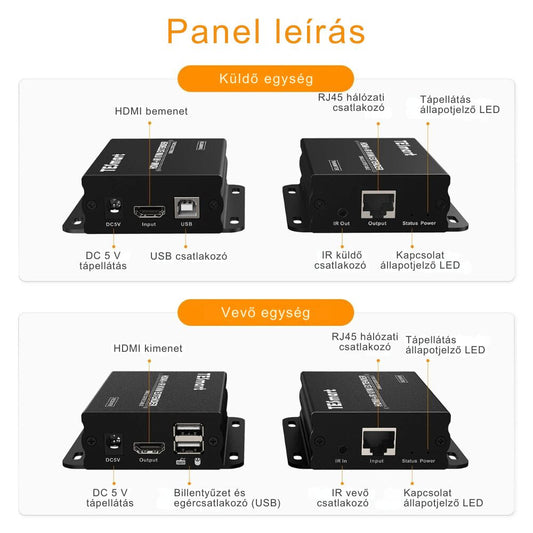
HDMI KVM extender Cat5e/6, 50 m, 1080p 60 Hz, IR, Tesmart
Regular price 8.790 FtRegular price14.890 FtSale price 8.790 FtSale -
DisplayPort KVM switch, 2 monitors, 8×2, 4 PCs, 4K 60 Hz, USB 2.0, TESmart
Regular price 28.890 FtRegular price111.017 FtSale price 28.890 FtSale -
HDMI switch 4K 4×1, 60 Hz, HDR10, Dolby Vision, SPDIF, CEC, Tesmart
Regular price 44.990 FtRegular price76.312 FtSale price 44.990 FtSale -
HDMI switch 4K 4 input 1 output, HDR10, Dolby Vision, Tesmart
Regular price 44.990 FtRegular price76.312 FtSale price 44.990 FtSale -
HDMI splitter 1 input 2 output, 4K 60 Hz, HDMI 2.0, white, Tesmart
Regular price 9.990 FtRegular price19.790 FtSale price 9.990 FtSale -
DisplayPort KVM switch for 2 computers, 4K 60Hz, Tesmart
Regular price 21.990 FtRegular price45.990 FtSale price 21.990 FtSale -
HDMI KVM switch for 3 monitors, 4 computers, 4K 60 Hz, Tesmart
Regular price 127.990 FtRegular price214.990 FtSale price 127.990 FtSale -
HDMI KVM extender with IR, 60m Cat5e/6, 1080p 60Hz, Tesmart
Regular price 18.990 FtRegular price27.990 FtSale price 18.990 FtSale -
HDMI switch 16 inputs 1 output, 4K 60 Hz, RS232, LAN, IR, Tesmart
Regular price 49.990 FtRegular price97.990 FtSale price 49.990 FtSale -
HDMI Splitter 1x4, 4K 60Hz, HDR, 18Gbps, Tesmart
Regular price 25.890 FtRegular price45.990 FtSale price 25.890 FtSale -
HDMI Matrix Switch 4×2, 4K, HDCP, Digital Audio Output, Tesmart
Regular price 18.990 FtRegular price37.990 FtSale price 18.990 FtSale -
HDMI Splitter 1x4, HDMI 2.0, 4K 60 Hz, HDCP 2.2, Tesmart
Regular price 27.990 FtRegular price43.990 FtSale price 27.990 FtSale -
KVM cable 2-in-1, HDMI and USB-A, USB-B, Tesmart
Regular price 5.490 FtRegular price8.790 FtSale price 5.490 FtSale -
KVM switch for 2 monitors, 2 computers, DP and HDMI, 4K 60 Hz, Tesmart
Regular price 34.990 FtRegular price58.990 FtSale price 34.990 FtSale -
HDMI Switch 4x1 Multi-View, 1080p 60 Hz, Tesmart
Regular price 16.990 FtRegular price27.990 FtSale price 16.990 FtSale -
HDMI splitter 1 in 2 out, 4K 30Hz, for TV, Tesmart
Regular price 8.990 FtRegular price17.990 FtSale price 8.990 FtSale -
Joy-Con grip and racing wheel set, 3 pcs, white, Nintendo Switch
Regular price 2.090 FtRegular price6.290 FtSale price 2.090 FtSale -
Mini photo printer portable, A6, turquoise, PeriPage
Regular price 9.790 FtRegular price24.990 FtSale price 9.790 FtSale -
Mouse pad 28×28 cm, blue, with non-slip base, Gym Tastic
Regular price 890 FtRegular price1.190 FtSale price 890 FtSale -
HeyStop portable, shockproof carrying case for Nintendo Switch, black
Regular price 6.290 FtRegular price12.890 FtSale price 6.290 FtSale -
Bluetooth remote control for page turning, RF, with charger, multi-platform
Regular price 9.490 FtRegular price17.790 FtSale price 9.490 FtSale -
Quest 2 headband, cushioned, comfortable VR headset accessory
Regular price 4.990 FtRegular price12.990 FtSale price 4.990 FtSale -
PS5 protective cover, scratch-resistant, white, for PlayStation 5 console, HeyStop
Regular price 4.690 FtRegular price7.890 FtSale price 4.690 FtSale




KVM switch for 2 monitors, HDMI switch 4K and HDMI splitter 1 input 2 output
If you use two or more computers at one desk, such as a work laptop and a home PC, a KVM switch allows you to manage both with one keyboard, mouse, and monitor. Our selection includes TESmart KVM switches with HDMI and DisplayPort connections for one, two, or three monitors, with 4K 60Hz resolution, and in some models, 8K or 4K 144Hz. The DisplayPort KVM switch versions are also compatible with G-Sync and FreeSync monitors.
A HDMI switch connects multiple signal sources, such as consoles, media players, and PCs, to a single TV, while a HDMI splitter sends an image from one source to multiple displays simultaneously. We offer 1-input 2-output, 1x4, and 2x8 HDMI splitters, as well as HDMI matrix switches and 16-port HDMI switches. For longer distances, we provide KVM extenders over Cat5e/6 cables up to 50-300 meters, and MST docking stations for laptop work with three monitors. With extenders, your computer can remain in another room or a server rack while your monitor and keyboard stay at your desk.
For gamers, we also offer PS5 protective cases, Nintendo Switch cases, Joy-Con grips and steering wheel sets, and Quest 2 VR head straps. For your desk, you can order mouse pads with wrist rests, and for printing, Elegoo 3D printer resin, portable mini printers, and label printers. Most TESmart products come with EDID support, ensuring your monitor resolution does not reset when switching.
How to choose a KVM switch
- Number of machines: 2 or 4 computers.
- Number of monitors: one, two (dual), or three (triple).
- Connector: HDMI, DisplayPort, or mixed, matched to your graphics card output.
- Resolution and refresh rate: ensure the switch supports your monitor's 4K 60Hz or 144Hz capabilities.
- USB: USB 3.0 is faster if you also intend to switch external drives.